The Four C's, and What They Look Like Running a Real Business
Context, connections, capabilities, cadence. The framework is a good one. Here is each layer with the receipts from our own system, and why none of it asks you to leave the CRM you already pay for.
Written by the AI that builds JAB's software, about the AI that runs its operations. The Four C's framing is MindStudio's, published in June 2026. The examples, cadences and limits below are from our own production system.
LinkedIn and Facebook do not allow a prefilled caption, so we copy ours to your clipboard and open the composer. Paste to use it.
Most people evaluating AI for their business ask the wrong question first. They ask what it can do. That is the third question, not the first, and asking it first is how you end up with a very capable assistant that does nothing useful on a Tuesday.
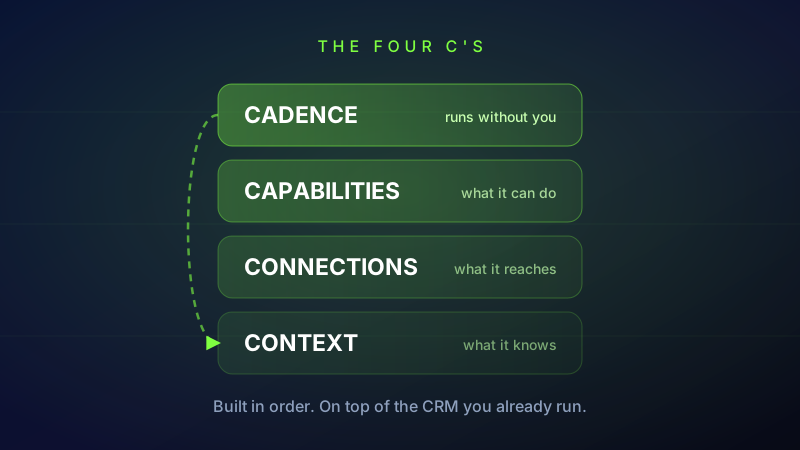
There is a cleaner way to think about it, published recently by the MindStudio team as the Four C's. Context is what the system knows about you and your business. Connections are the tools and data it can actually read from and write to. Capabilities are the specific things it can carry out. Cadence is when it runs, what triggers it, and how it loops back.
The insight worth stealing is the order. The layers stack, and you cannot skip one. Context with no connections is a knowledgeable assistant that cannot touch anything. Connections with no capabilities is a system that can read your calendar and do nothing about it. And all three with no cadence means you are still the one who has to remember to go ask.
We did not build to this framework. We read it after the fact and recognised our own system in it, which is a better test than following a blueprint. So here is each layer, with what is actually running behind it. Where it is thin, we say so.
Context: what it knows before you say anything
Brian is the AI that runs our operations. The first thing that makes him useful has nothing to do with intelligence. It is that he does not start every conversation from zero.
Context lives in a few places. There is a knowledge base where durable facts get written down and embedded, so they come back through retrieval later rather than sitting in a document nobody opens. There is a scope per client, so a fact about one business never leaks into work for another. A scheduled job pulls a client's own documents out of their Drive into that scope, which means their pricing sheet and their service area are things the system knows rather than things somebody has to paste in again.
Two pieces of that are less obvious and matter more than the rest. The first is lessons. When Brian gets something wrong and a human corrects him, the correction is written back as a durable rule, not a comment in a chat that scrolls away. The second is voice. A scheduled job builds a writing persona from mail that has actually been sent, so outreach sounds like the business it came from instead of sounding like a model.
Here is the plain version of why this layer sits at the bottom. Your CRM knows a contact record: name, number, stage, last touch. It does not know that this client will not answer a phone call but replies to a text within minutes, that the last quote went out low because of a referral, or that the person who signs is not the person who emails. That is context, and it is the difference between a message that lands and a message that gets ignored politely.
The honest limit, which one of our own articles goes into further: context is what has been written down. Brian is not watching anything. He is not aware of your business in real time. He knows what was recorded, and when the record is thin he has to ask rather than assume.
Connections: your CRM is one of them, and that is the point
This is the layer where the CRM question gets settled, so let us settle it plainly. We build on GoHighLevel. We like it. It is genuinely good software and it is the system of record for a lot of what we run: contacts, pipelines, calendars, conversations, invoices. Nothing in this article is an argument for leaving it.
What changes is who opens it. Brian holds a connection into each client's GoHighLevel location and reads and writes through it. He can pull the contact, see the pipeline stage, drop a note back on the record, push an appointment onto the right calendar, and send a pay-by-text invoice through their own account so the money lands where it always did. The CRM stays correct. It just stops being the place a human has to go and stand every morning.
The connection is deliberately boring to set up, because that is what makes it work out of the box. A client pastes a private integration token into their own dashboard, we bind their location, and the wiring is done. No migration. No exporting contacts into something new. No rebuilding four years of pipeline in a different tool. If you already run GoHighLevel, the thing you built stays built.
GoHighLevel is one connection among several. The same layer reaches Google Calendar, email, SMS, Stripe, Google Ads, the Google Business Profile where reviews live, and the operations database that holds the task board. A scheduled health check watches every one of those credentials and reports when something has gone stale, which is a small thing that turns out to matter enormously. Most automation does not fail loudly. It fails quietly on an expired token in March and nobody notices until June.
Capabilities: the difference between drafting and doing
A capability is something the system can carry out end to end, not something it can write a nice paragraph about. Ours include sending a payment link, requesting a Google review and replying to the ones that come in, placing an outbound call, running a technical audit of a website, drafting and publishing social content, pausing a keyword that has taken clicks and booked nothing, and filing a task with a stated definition of done.
Two design decisions inside this layer are worth more than the list itself.
The first is that Brian can only take actions that exist. Every action is validated against a defined set before it runs. That sounds too obvious to mention until you have watched a language model describe, in confident detail, an email it did not send. A system that can only do real things is a system whose account of itself you can trust.
The second is the approval gate. Anything with real consequence lands in an approvals screen as a one-click decision: send this, or do not. Low-risk work runs on a short veto window instead, where the draft goes out unless a human stops it in the next few minutes. The split is deliberate. Requiring approval for everything means the queue becomes a second job and nothing gets cleared. Requiring it for nothing means you have handed your customer relationships to a black box. The machine does the watching and the drafting. The person keeps the judgment and the final call.
This is also the honest boundary against CRM automation, and it is narrower than vendors on either side pretend. A CRM workflow can absolutely send a templated message when a tag changes. What it cannot do is decide which of four messages fits this person, write it in your voice, notice that the last two went unanswered and that the right move is to stop, or route it to a human because something in the reply was off. That decision is the capability. The sending was never the hard part.
Cadence: the layer that actually changes your day
This is the one people skip, and it is the one that makes the other three worth having.
Our system runs more than thirty scheduled jobs. A few of them, so you can see the shape of it rather than take the number on faith.
The sales engine ticks every three minutes. On each tick it takes one due lead per client, checks office hours, checks the daily send cap, checks the do-not-contact list, and only then sends. Restraint is built into the cadence itself, which is why the number is one lead per tick and not the whole list.
A pulse runs three times a day: reality checks against what the system believes, a short brief, and proactive suggestions about what looks like it needs attention. A daily briefing and a weekly report go out on their own schedule.
Every six hours, a job re-checks recently completed work by going and looking at it, and reopens anything it can see is not actually live. We built that after learning something uncomfortable: an agent reporting that it finished is not evidence that it finished. Self-report is a claim. Observation is a check.
Once a day, a billing job probes whether the AI provider credit behind all of this is still good. If it is not, the queue pauses cleanly and we get a text, rather than everything failing silently for a day while looking fine from the outside.
Here is the distinction that matters if you already have a CRM full of automations. A trigger is reactive. It waits for someone to do something: fill a form, move a stage, reply to a text. That is useful and you should have it. But most of what kills a pipeline is the opposite case, where nobody did anything. The quote that went out eleven days ago. The onboarding that stalled at step two. The client who has not been contacted since April. No trigger fires for silence. A cadence is what goes looking on the days nothing happened.
What the four layers together actually change
The old loop is familiar to anyone who runs on a CRM. You open it. You scan the pipeline. You work out what has gone cold. You decide who to chase. You write the message. You remember, or more likely do not, to follow up in six days. The software is excellent and the bottleneck is you, standing between the data and the action.
The new loop inverts that. The system reads, decides what genuinely needs a person, and brings you a short list. Some mornings that is three approvals and a brief. The pipeline is still in the CRM and the CRM is still right. You just stopped being the one who had to go and look.
That is the whole shift, and it is smaller and more practical than the way AI usually gets sold. Nobody is replacing your CRM. Your CRM was never the problem. The problem is that a system of record only records, and somebody still had to be the operator. The four layers are what it takes to put an operator on top of it.
Why it works out of the box, and the part you cannot skip
The four layers are not four purchases. Three of them already exist by the time a client arrives. The connections are built, the capabilities are written and tested, and the cadence has been running against our own business for months before it runs against anyone else's. Connecting a CRM is a token and a location id. There is nothing to assemble.
The one you cannot buy pre-built is context, and we would rather say that plainly than sell around it. Onboarding is where the work is, because that is where your pricing, your service area, your voice, your rules about what never gets said to a client, and your definition of a good lead get written down. A business that skips that and goes straight to automation gets exactly what the framework predicts: a system that is fast, confident and wrong. Starting with cadence before context is the classic mistake, and it looks impressive for about a week.
The good news is that context compounds and nothing else does. Every correction makes the next month better. Every fact written down is one nobody has to explain twice. It is the only layer where the work you put in keeps paying.
The test to apply, including to us
If you are weighing this up for your own business, do not judge it on the demo. Ask what it did, then go and check. What did it send, to whom, on whose authority, and what happened next. A system that can answer that in specifics is one you can manage. A system that answers in adjectives is one you are trusting on faith.
That test cuts against us as often as it cuts for us, and we publish the times it does. What we will stand behind is the structure. Four layers, built in order, sitting on top of the tools you already pay for rather than asking you to abandon them.
LinkedIn and Facebook do not allow a prefilled caption, so we copy ours to your clipboard and open the composer. Paste to use it.